
Why texting is the expense-tracking method that sticks
You already narrate your spending — to your partner, in your notes app, in your head. Chat-based tracking piggybacks on that habit instead of fighting it. There's no category picker, no date field, no form. The moment of purchase and the moment of logging collapse into one five-second message.
Because the friction is near zero, the small transactions get captured too — the coffees, snacks and bus rides that silently eat budgets and never make it into manual trackers.
What you can say to Mona
Mona understands natural language, so all of these work:
- “$15 groceries at Walmart” — simple amount + category + merchant.
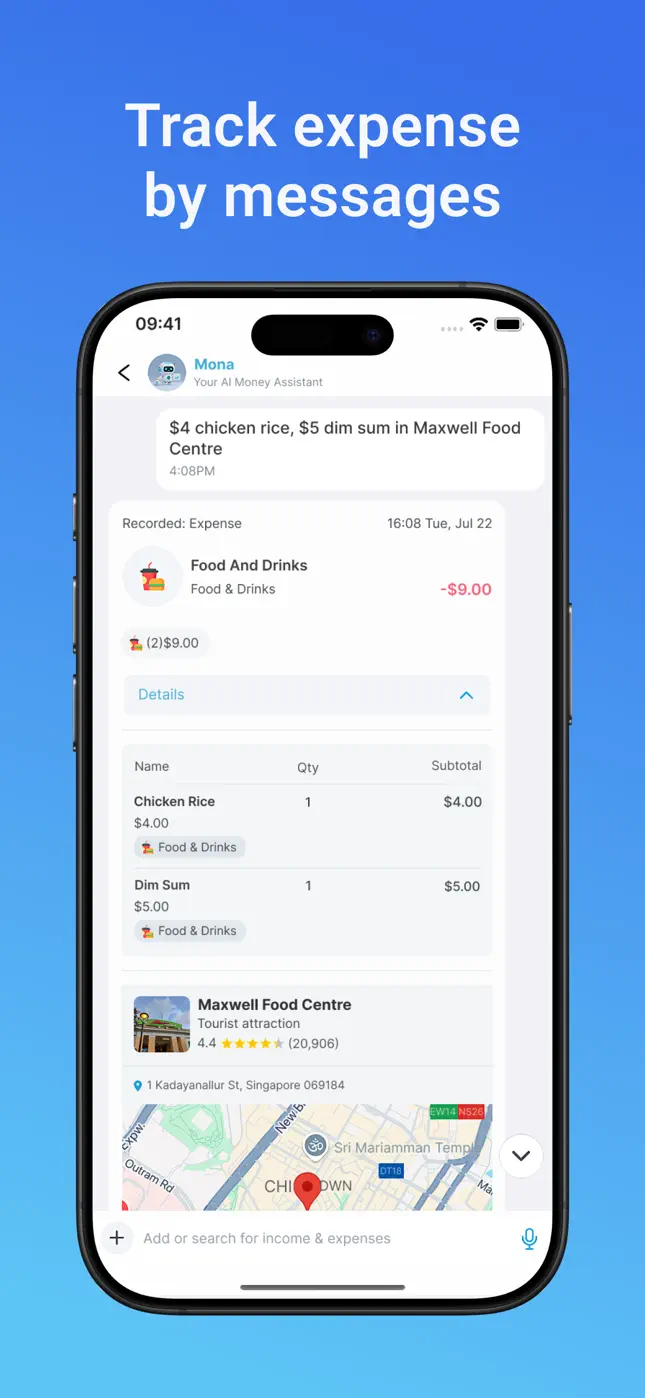
- “$4 chicken rice, $5 dim sum in Maxwell Food Centre” — multiple items in one message, each itemized.
- “Got paid $50 for the design gig” — income works too.
- “How much did I spend on food this month?” — questions about your history get answers, not just logging.
Prefer speaking? Tap the mic and say it — voice input goes through the same AI.

Try it free now
Money Tracker – Mona AI · Free on iPhone & Android · No bank login required


How to set it up, step by step
- Get the app. Download Money Tracker – Mona AI free on iPhone, iPad or Android.
- Open Mona's chat. It's the heart of the app — your AI money assistant lives there.
- Text your last purchase. Whatever you bought today, in your own words.
- Check the recorded card. Mona replies with the structured expense: items, amounts, category, time and place. Tap to edit anything.
- Make it a reflex. Pay → text Mona → pocket the phone. Five seconds, done.
From messages to money insights
Every texted expense feeds the rest of the app automatically: your monthly budget gauge, category spending trends, the expense map, and your full transaction history with smart search. You put in sentences; you get out a complete picture of your money.
Frequently asked questions
Do I need to use exact formats or commands?+
No. Mona parses everyday language. Amounts, items, merchants and places are picked up wherever they appear in your message.
Can I log multiple items in one text?+
Yes — list them naturally (“$4 chicken rice, $5 dim sum”) and each becomes its own line item under one transaction.
Is there a limit on AI messages?+
Free accounts include a generous monthly allowance; Premium unlocks unlimited messages with your AI assistant.
Ready to put this into practice?
Download Money Tracker – Mona AI free and set it up before your next purchase.