Why travel breaks normal expense tracking
At home, your spending is routine and one-currency. Traveling, everything changes at once: unfamiliar prices, cash-heavy markets, foreign receipts, and purchases happening ten times a day. Bank feeds are worst exactly here — foreign transactions post days late with conversion mysteries, and cash vanishes without a trace.
Logging at the moment of purchase is the only method that survives a trip — which is why the five-second message matters: “€12 tapas, €4 metro”, pocket the phone, keep walking.
The expense map: see your trip in money
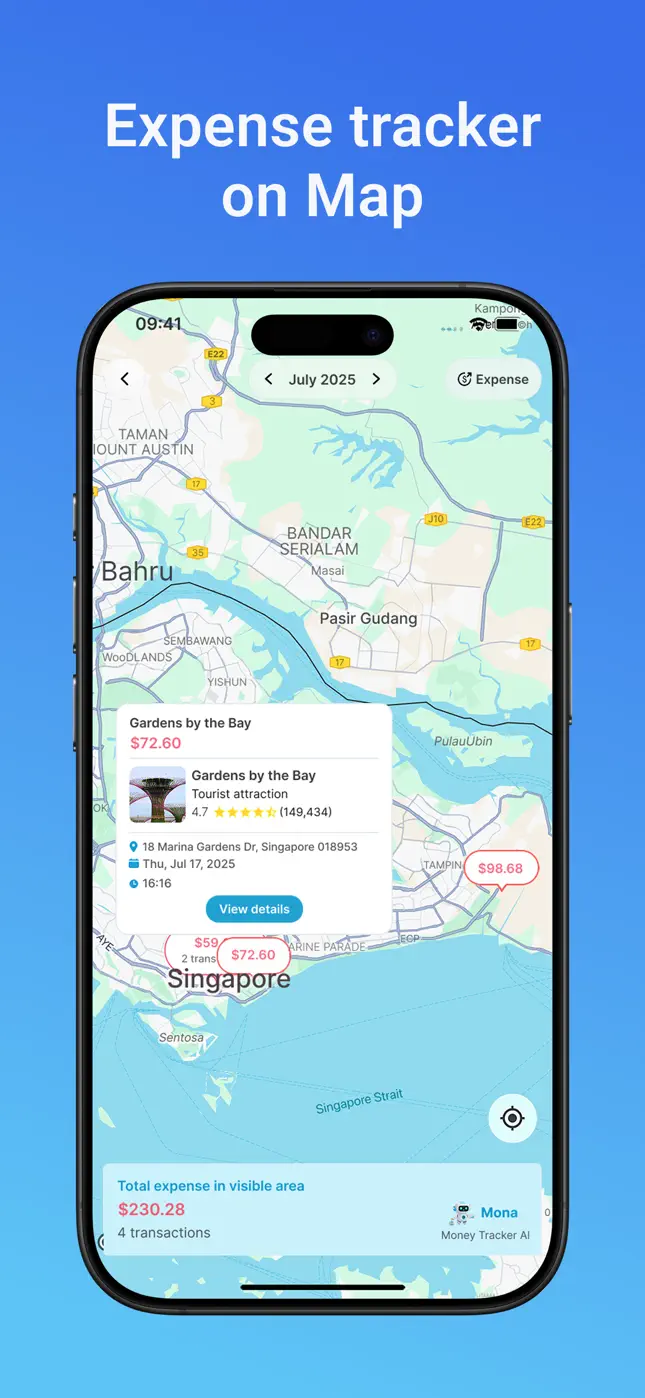
Mona's map view is built for travelers. Every logged expense is pinned where it happened, with amounts on the pins and a running total for the visible area. Zoom to a city and see what three days there cost; tap a pin for the full transaction, place details included.
It's equal parts budgeting tool and travel diary — “that $72.60 at Gardens by the Bay” is a memory with a receipt attached.

Try it free now
Money Tracker – Mona AI · Free on iPhone & Android · No bank login required
How to run a trip budget in Mona, step by step
- Before you go: download Mona AI free and create a dedicated trip wallet (e.g. “Japan 2026”).
- Set a trip budget — total plus a Food & Drinks limit is usually enough on the road.
- Log as you spend: text purchases in local currency, or photograph receipts — Mona itemizes them.
- Check the map each evening. The day's spending, pinned and totaled, in ten seconds.
- Land with the answer. Your trip wallet holds the true cost — by category, by city, by day — with zero post-trip spreadsheet archaeology.
Works offline-first by design
Because you log by message rather than bank sync, there's nothing to “connect” abroad — no foreign-bank support issues, no roaming-dependent feeds. Mona also speaks 30+ languages, so the assistant works in whatever language you think in.
Frequently asked questions
Does Mona convert currencies?+
Mona records expenses in multiple currencies, so trip spending stays accurate in the money you actually paid — ideal for multi-country itineraries.
Can I keep trip spending separate from home spending?+
Yes — create a dedicated wallet per trip. Unlimited wallets mean each holiday gets its own clean budget and history.
Do foreign receipts scan correctly?+
Yes — the money scanner reads real-world receipts, and Mona's AI supports 30+ languages.
Ready to put this into practice?
Download Money Tracker – Mona AI free and set it up before your next purchase.