
Why a receipt scanner beats manual entry
Receipts hold the richest spending data you have — every item, every price — but almost nobody transcribes them. That's why most people's “groceries” category is a single opaque number. Scanning fixes this: you keep item-level detail (what actually cost you $98 at the pharmacy) without doing any data entry.
It matters for practical reasons too: returns and warranties, reimbursements, taxes, and splitting shared costs all get easier when every receipt is searchable in one place.
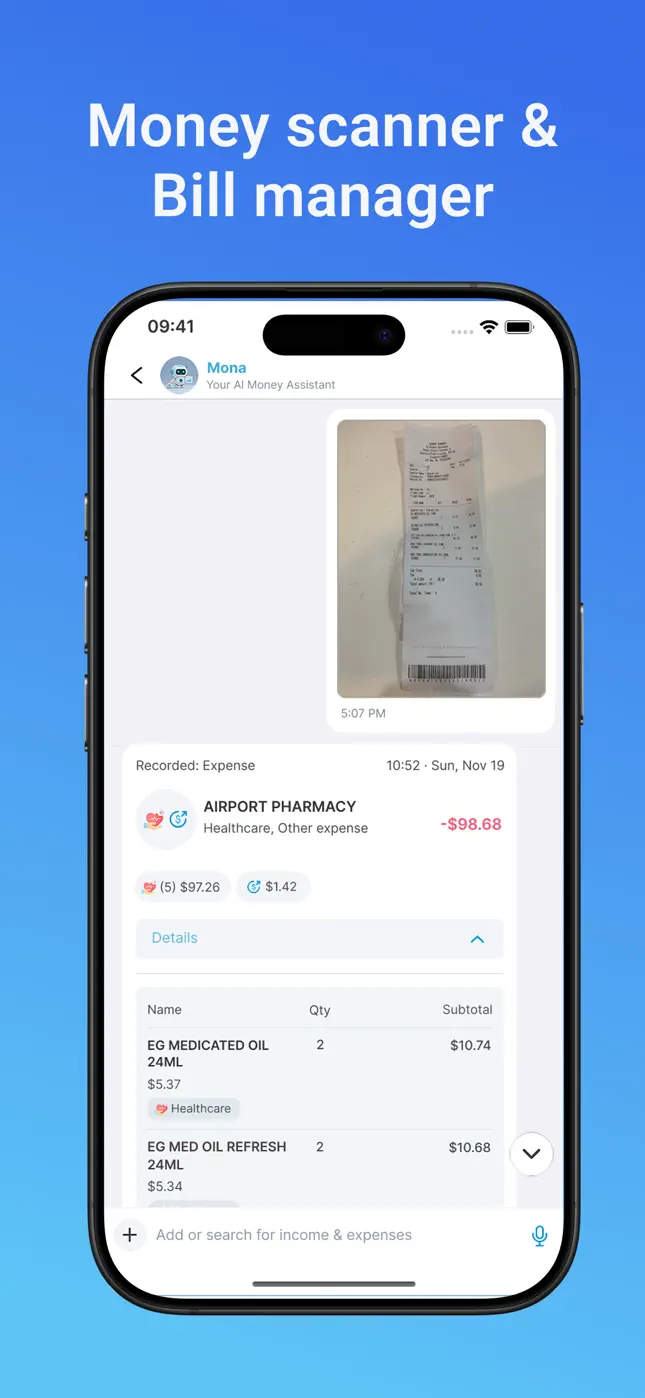
What Mona's money scanner extracts
- Merchant & location — e.g. “Airport Pharmacy”, matched with place details.
- Every line item — names, quantities and per-item prices, not just the total.
- Per-item categories — a pharmacy run can be split into Healthcare and Other automatically.
- Date and time — recorded into your transaction history and monthly totals.
The result appears in the chat seconds after the photo, and every field is editable if you want to adjust it.

Try it free now
Money Tracker – Mona AI · Free on iPhone & Android · No bank login required


How to scan a receipt with Mona AI, step by step
- Download Mona AI — free on the App Store or Google Play.
- Open the chat and tap +. Choose the camera (or pick an existing photo from your library).
- Photograph the receipt. Flat and well-lit helps, but the scanner handles crumpled, real-world receipts.
- Review the result. Mona posts the itemized expense — merchant, items, quantities, totals, categories. Tap Details to expand every line.
- Done — budgets update automatically. The expense flows into your budget planner, trends and history instantly.
Tips for high-accuracy scanning
- Capture the whole receipt in frame, including the total line.
- Long receipt? Scanning still works — Mona reads top to bottom; make sure the text is legible.
- Digital receipts (email/screenshot) can be added from your photo library the same way.
- Free accounts get a monthly scan allowance; Premium unlocks unlimited scans with advanced accuracy.
Frequently asked questions
Does the receipt scanner work for bills too?+
Yes — Mona is a receipt scanner and bill manager in one. Scan utility bills or invoices and track recurring payments with due dates in the bill tracker.
Do I have to type anything after scanning?+
No. The scan produces a complete transaction automatically. You only touch it if you want to change a category or item.
How many receipts can I scan for free?+
The free plan includes a monthly allowance of scans; Premium removes the limit and adds advanced accuracy.
Ready to put this into practice?
Download Money Tracker – Mona AI free and set it up before your next purchase.