
Why manual expense tracking always breaks down
Every abandoned budgeting app tells the same story. Week one, you log everything. Week two, you skip the small stuff. Week three, the data is so incomplete it's useless — so you quit. The problem was never discipline; it was friction. Opening an app, tapping through category pickers and typing amounts takes 30–60 seconds per purchase, dozens of times a week.
AI expense tracking flips the effort. You describe the purchase the way you'd text a friend, and the software does the structured data entry. When logging takes five seconds, you actually keep doing it — and a money tracker you keep using beats a “powerful” one you abandoned.
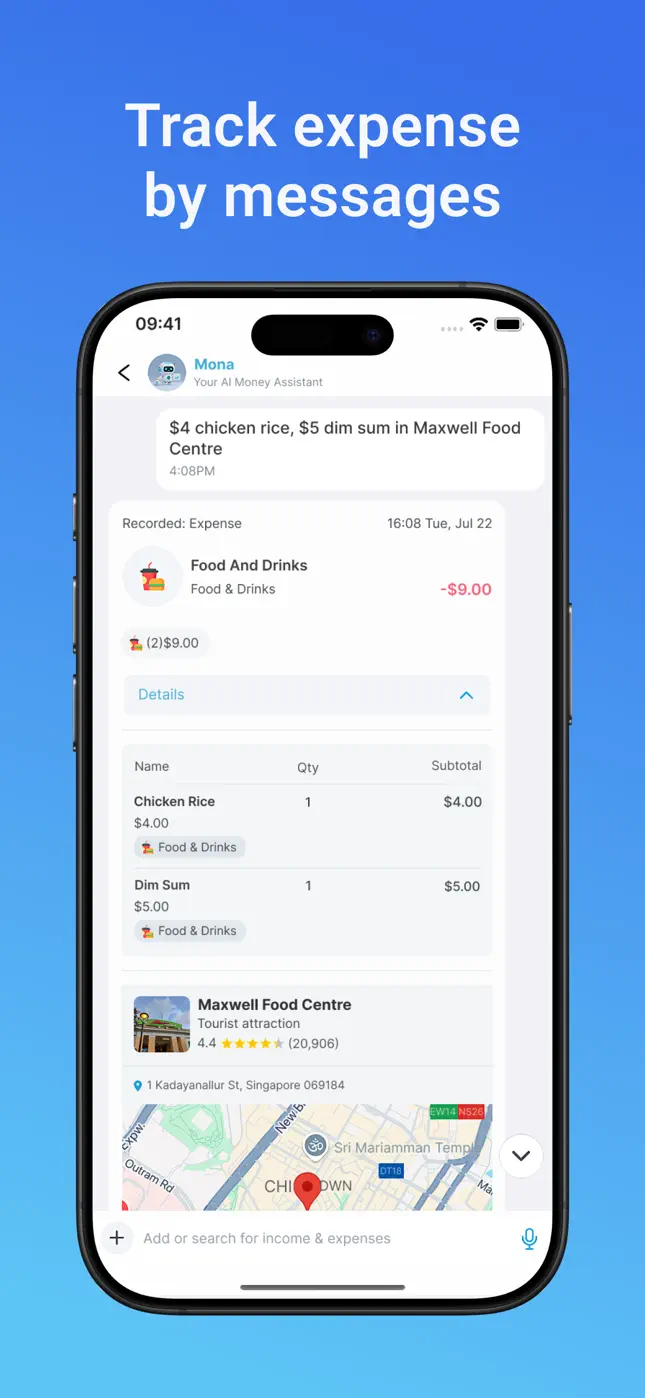
What Mona AI automates for you
- Parsing: “$4 chicken rice, $5 dim sum at Maxwell Food Centre” becomes two line items with prices, a merchant and a location — from one message.
- Receipt scanning: photograph any receipt and Mona's money scanner extracts every line item, quantity and total.
- Categorization: food, shopping, healthcare, transport — assigned automatically, editable if you disagree.
- Budget math: every recorded expense updates your monthly budget, category limits and spending trends in real time.
- Search: ask for any past transaction in the chat and Mona finds it instantly.

Try it free now
Money Tracker – Mona AI · Free on iPhone & Android · No bank login required


How to set up Mona AI, step by step
- Download the app. Get Money Tracker – Mona AI free on the App Store or on Google Play.
- Create your first wallet. One for personal spending is enough to start; you can add unlimited wallets later.
- Text your first expense. Type something you bought today, exactly how you'd say it out loud. Watch Mona itemize and categorize it.
- Snap a receipt. Tap the + in the chat and photograph any paper receipt to see the scanner extract every line.
- Set a monthly budget. Add a total budget and one or two category limits — Mona's gauge shows what's remaining from day one.
Is an AI expense tracker accurate?
Mona shows you exactly what it recorded — merchant, items, quantities, prices, category — immediately after each message or scan, so mistakes are caught in the moment, not at the end of the month. Anything can be edited with a tap. In practice, review-as-you-go delivers cleaner data than either manual entry (people round, skip and forget) or bank feeds (cryptic merchant strings, no line items).
Frequently asked questions
Is Mona AI free to use?+
Yes — Mona AI is free to download and use. An optional Premium plan adds unlimited receipt scans, unlimited AI messages and an ad-free experience.
Does an AI expense tracker need my bank account?+
No. Mona works entirely from your messages, voice input and receipt photos — no bank login is ever requested. See the guide to budgeting without bank linking.
Can I use voice instead of typing?+
Yes. Tap the microphone in Mona's chat and speak your expense — the AI records it the same way as a text message.
Ready to put this into practice?
Download Money Tracker – Mona AI free and set it up before your next purchase.